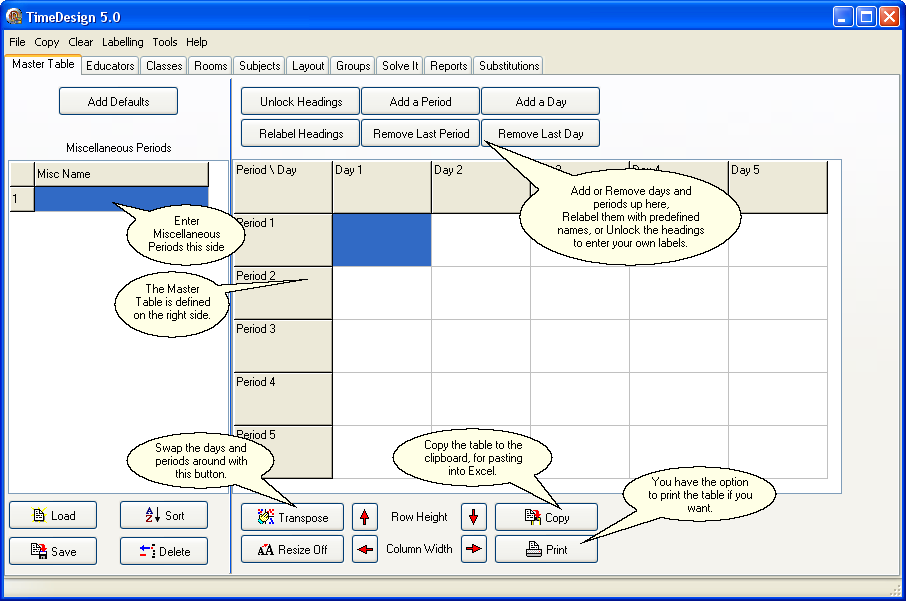
Miscellaneous Periods
Simply enter the names of the miscellaneous periods as you want them displayed. To save time, Assembly, Break and Lunch will be entered for you if you click, the 'Add Defaults' button.
To edit a line, select that line either by using the arrow keys or clicking on it with the mouse cursor. You may either double click on the cell or press the 'F2' key to edit the existing information or you may simply start typing and the old information will be overridden.
You are not limited by the number of miscellaneous periods in the timetable.
Please Note:
The program sees the miscellaneous period simply as a place holder within the timetable. In allocating multiple contiguous periods, the program will assume that its safe to span this period. On the other hand, a Blocked Period will not be spanned.
The Master Table
This could actually be classed as the main template. You would configure all the items that occur to the entire school/institution and then copy this to all the other entities.
You still have the ability to personalise individual timetables of educators, classes, rooms, subject, and groups.
Configuring the timetable is simply a matter of selecting the required period or periods(you may hold the left mouse button down to select a row or rectangular region), and right clicking the mouse for a pop-up menu of choices.
Once you have done this, you may then copy this down to the lower levels.
Please Note:
New educators, classes, rooms, subjects and groups will inherit the master table when they are entered, you may then personalise it for them.